Types of Access Controls: MAC, DAC, RBAC, ABAC, and More
On April 15, 2026, the French government's official identity document portal, run by ANTS (also known as France Titres), detected a significant security breach. An attacker gained access to millions of records from the portal. They didn't crack a password or deploy malware. They figured out a way to send a simple web request that handed over other users' data. The portal checked whether the user was logged in but never checked whether the record they asked for was theirs. That's authentication without authorization. France Titres confirmed on April 24, 2026 that the breach compromised 11.7 million citizen accounts.
Access controls decide who can see and do what in your systems. They're among the most heavily tested controls in any SOX, IT, or security audit, because almost every other control depends on the appropriate people having access.
The Six Models at a Glance
| Model | Who decides | Access is based on | Typical use |
|---|---|---|---|
| Mandatory (MAC) | A central administrator, under system-enforced policy | Security labels on data matched to user clearances | Government, defense, and other highly sensitive environments with strong data classification policies |
| Discretionary (DAC) | The data owner | The owner's choice of who to share with | File shares, documents, collaboration tools |
| Rule-based (RuBAC) | An administrator who writes the rules | Predefined rules applied equally to everyone | Firewalls, network devices, time-of-day restrictions |
| Role-based (RBAC) | An administrator who designs roles with review by the data owner | The user's job role | Most business applications and ERPs |
| Attribute-based (ABAC) | Policies that evaluate attributes | Attributes of the user, the resource, and the environment | Cloud platforms, complex or dynamic environments |
| Policy-based (PBAC) | Organizational policy, often managed centrally | Business roles combined with written policy | Large enterprises aligning access with governance requirements |
The Six Models Explained
Mandatory Access Control (MAC)
Under MAC, the system enforces access based on classification labels, and ordinary users and data owners can't change them. Each resource carries a sensitivity label, such as Confidential or Secret, and each user or application has a clearance level. Access is granted only when the clearance meets the label's requirements.
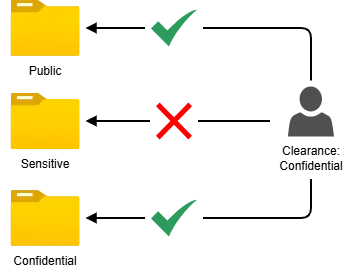
MAC is restrictive by design. Anything not explicitly permitted is denied, and only the administrator can change a resource's classification. This also requires a strong data classification policy.
Discretionary Access Control (DAC)
DAC puts the decision with the data owner, who chooses who can access a resource and at what level, such as read-only or edit. Sharing a folder or a document with specific colleagues is DAC.
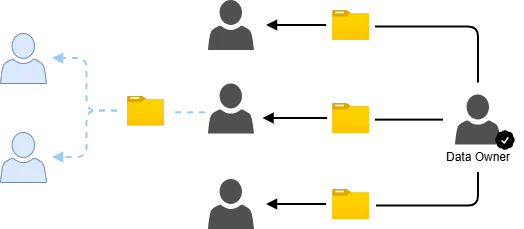
DAC is flexible and easy for users, but that flexibility is also its weakness: access can spread quickly and inconsistently. In systems that also enforce MAC, DAC acts as an extra filter and can only narrow access further; it can never grant access that mandatory rules forbid.
Rule-Based Access Control (RuBAC)
RuBAC grants or denies access according to predefined rules, often kept in an access control list (ACL), which the system evaluates every time access is requested. The rules apply to everyone equally, regardless of who they are. A firewall that blocks certain traffic, or a system that only allows logins during business hours, are typical examples.

RuBAC is straightforward for broad restrictions. It becomes hard to manage when access needs to be controlled at a very detailed level, because the number of rules grows quickly.
Role-Based Access Control (RBAC)
RBAC ties access to job roles rather than to individuals. The organization defines roles, such as Accounts Payable Clerk or IT Auditor, assigns each role the permissions it needs, and then places users into roles. When someone joins, they get their role's access right away; when they change jobs or leave, access is removed with the role.

RBAC is the industry-standard approach for most business applications. It makes access easier to administer, review, and align with segregation of duties. Its main risk is role creep: roles that accumulate excess permissions over time, or users who keep old roles after moving to a new position.
Attribute-Based Access Control (ABAC)
ABAC evaluates attributes to decide access: attributes of the user (department, location, cost center, manager), of the resource (classification, owner), and of the environment (time, device, network). For example, a policy might allow only users whose office location is Chicago to connect to the Chicago office's database management system during business hours only.
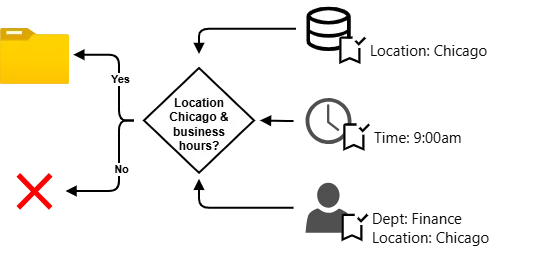
ABAC is highly flexible and well suited to cloud and dynamic environments, because access adjusts automatically as attributes change. The tradeoff is complexity: it depends on accurate, well-maintained attribute data, and its policies can be harder to review.
Policy-Based Access Control (PBAC)
PBAC combines users' business roles with organizational policies to decide what access each role should have. Policies, rather than individual administrators, drive access decisions. For instance, a security policy might allow a user who signs in remotely with multi-factor authentication to reach a specific file share, but not one who signs in without it.

PBAC helps large organizations keep access consistent with governance and regulatory requirements across many systems. It works best with centralized identity and access management tools.
Choosing and Combining Models
Most organizations don't pick just one model. A typical environment uses RBAC inside its ERP, DAC for shared drives and documents, RuBAC on its firewalls, and ABAC or PBAC in its cloud platforms. The goal is to match each model to the sensitivity and complexity of the system it protects.
Whatever the mix, three principles should guide the design:
- Least privilege. Users get only the access they need to do their jobs, and nothing more.
- Need to know. Access to sensitive information is limited to people with a specific business reason to see it.
- Segregation of duties. No single person's access should let them complete and conceal an incompatible set of tasks, such as creating a vendor and approving its payments.
What Auditors Look For
The model is only as good as the processes around it. When auditors review access controls, they typically focus on:
- Provisioning. New access is requested, approved by the right person, and matches the user's role before it's granted.
- Deprovisioning. Access is removed promptly when users leave or change jobs. Terminated users with active accounts are among the most common audit findings.
- Periodic access reviews. Managers or data owners regularly confirm that each user's access is still appropriate, and the removals they request are actually made.
- Role design. Roles in an RBAC model are documented, reviewed, and free of segregation of duties conflicts.
- Privileged access. Administrator and superuser accounts are limited, tied to named individuals, and monitored.
- Shared and generic accounts. These are minimized, and where they exist, someone is accountable for their use.
- Policy and attribute accuracy. In ABAC and PBAC environments, the attribute data and policies driving decisions are accurate and change-controlled.
The Bottom Line
There's no single best access control model. MAC offers the tightest control, DAC the most flexibility, RBAC the easiest administration, and ABAC and PBAC the most adaptability. Strong access control comes from choosing the right model for each system and backing it with disciplined provisioning, deprovisioning, and review.